Thursday, October 17, 2013

Revamp, Restart..HERE TO DO MARKETING PHOTOS FOR YOU TODAY...SPECIALITIES PHOTO WORK IN EASTERN TENNESSEE

The new website in the previous post will not be for now..that is the recent business decision. For now it is this..the Thomas Haynes Photoshoot Blog of Thomas Haynes Photography.   We still will  call specialty commercial photography the See Us Now part of our work, the place we first publish your work at its best, what you do whether it be remodeling, catering, landscape and hard scape, water ponds,  general construction, wall paper service, raising horses, llamas, baking breads or building barns, out buildings and more.  The idea is simple: We use our photography skills to show your work in the best light.  Our full  photography website  is where your photos and slideshows are kept, where you access what you need or where you send clients to view your work.

The idea is to showcase to your potential and present clients what you have done NOW.  In striking images we illustrate why you are the choice for the services you offer. With our photography of your work, you can proudly say "See Us Now" via Internet website and social media, email and print.  Working in the greater Knoxville area of Tennessee, including Anderson, Roane and surrounding counties, Oak Ridge, Clinton, Kingston and more, we believe there are many businesses who will benefit from our marketing photography.  We do on site and in-house photos...in your business house for you as you need it.

championship mules, swishing tails from rear, Frozen Head natural area, 2004
Championship level mules,  Frozen Head Natural Area, Morgan County, Tenn.

We do wish the new dedicated website was soon to be but it is not.  We must focus locally to begin further development of the SEE US NOW marketing concept for our clients.  We want you to see  photos what you do as seen through our eyes and how those images can catch the attention of  customers.
-------------------------------
Take a minute to see photos we have taken. Clink the link highlighted below.  Photos of job site, animals, pet rescue organizations...structures and property including real estate...art imaging...technical photography...events of intimate scale such as the block party shown...high dynamic range photography.  Email and ask about what you have in mind.

Click here for a  sample of photos from the primary website where your gallery and images will be stored.


 --------------------------------

Contact now to schedule a face to face meet with the primary photographer.  We will come to you and talk about Thomas Haynes Photography creating a visual attention getter for your business services.
 --------------------------------------

#personal attention #great photography #marketing what you do  #greater Knoxville area photographer #custom photography service 

                        -------------------------------------
Ok, why the mules? These are competitive champion mules seen at the Frozen Head Natural Area in Morgan County, Tennessee. So happens, mules are part of the business.
-------------------------------------------
See post below for link to example of panorama virtual tour presentation.

Wednesday, August 28, 2013

You are smarter than your camera...how to get accurate color in photos

YOU ARE SMARTER THAN YOUR CAMERA
---HELP IT DO BETTER

There are at least three options your camera needs if you plan to do better photo work in all sorts of lighting situations: 

1. To manually set the ISO (call it film speed)

2. An actual view finder you look through in addition to the screen on the back

3. The option to set a Custom or Preset White Balance

Camera white balance options, from Nikon DSLR manual.

White balance settings for Nikon DSLR
This article deals with White Balance.
You need to help your camera find what is really white to start with. You really, really, really need to do this! WHITE BALANCE is what the camera uses to determine what a color is. For instance, in a room lit with regular light bulbs, it is called incandescent or “tungsten” lighting. The light is naturally on the amber/yellowish side. If your camera is set for daylight pictures, your photos inside the room are all going to have a rather unpleasing and in-accurate amber/yellow cast.  A wall painted white or a white dress will not look the best if amber/yellow. We do not do weddings at Thomas Haynes Photography and don't have to worry about the dress looking right for everyone, whew! Walls being the correct color, that we do have to get right.  If camera thinks amber/yellow is white and decides how other colors look from there…what a mess that will be.  You already know how to fix that! I do not mean Photoshop™ or Paint Shop Pro™ or other software.  Sure, software will let you adjust color but why spend so much time doing that and still not getting it exactly right when you, smarter than your camera, can tell your camera which colors are accurate to start.  Then and only then use software to fine tune it all. 

You put the camera setting on AUTO for white balance or you select that little light bulb symbol for “incandescent”. Is that it? Either way, you photos will now be much closer to accurate color.  Look at your photos. Auto might have done ok but the setting for incandescent did not do so well this time. What happened to the color?  Mixed lighting is the culprit…daylight from the windows, funky color from spiral fluorescent bulbs, a halogen track light here and there—a mix too jumbled for basic incandescent camera settings to correct.   But, there is a better way to do it and most digital cameras have this option:  Custom or Preset white balance.  

“Read the manual” is good advice and is how you will learn to make a custom white balance for the room you need to photograph.  While different cameras use different instructions, buttons or knobs to set white balance, the basic event is the same.  Take a photo of a white sheet of paper or white foam core board.  The camera is set to use this reading as the starting point for “what is actually white”. All the kinds of light in the room are taken into account because that is what is lighting the white card.

Taking photo or white foam core card to set white balance of camera
 Using a white card to set camera white balance: In this instance, the green paint of the house was showing as light gray and preset white balance was needed for accurate color.
  

To set "pre" white balance on the Nikon DSLR cameras we use, the white balance setting is moved from Auto all the way over to PRE.  The white balance button is pressed and soon enough the word “pre” begins to flash in the control panel on top of the camera.  Then, a photo is shot of the white paper or card.  If the camera gets a good reading, the word “good” shows in the panel.  Keep the white balance set on pre and you are good to go for all the situations with lighting like in the place you did the custom white balance setting.  This IS more accurate than Auto because it literally uses the available lighting and the white photo to set a correct starting point (white) for other colors in your photographs.  Note, the white does not need to totally fill the view and does not need to be in focus.  Believe it..When Thomas Haynes Photography heads out of Clinton, Tennessee to shoot photos for a client, before any photos are taken we set the preset white balance for the scene.

Remember, by all means change the white balance when you move into a scene or room with totally different lighting or go outside.  Auto generally works acceptably outside and in many interior situations where lighting is relatively uniform.  Try preset or custom white balance to get you out of color trouble in difficult lighting and overall better color rendition by the camera.

At Thomas Haynes Photography, we go one step further.  We use a color chart like this one from xrite:
Xrite Color Checker color card, thomas haynes photo
Color Checker Passport by Xrite,  used for accurate color rendition from camera to computer editing.
 White Card of Color Checker Passport by Xrite, thomas haynes photo
"White Card" section of Color Checker Passport, designed for proper light reflection.

While we consider a color reference such as the XRite products Passport totally necessary to get accurate color critically accurate, simply using a custom or preset white balance from a white sheet of printer paper or sturdier white foam core board will work a small miracle in difficult lighting situations.  

You can do it...if you would rather spend your time with clients and not so much with a camera and editing software, drop an email to Thomas Haynes Photography using the email box at upper right of the blog page. We will respond and meet with you as you wish.  We work in the greater Knoxville area of east Tennessee, out of Clinton.  Email us and a we may begin a conversation on normal email where you are not limited to the blog page text box.

Send questions,brag on us(yes!) honestly, make comments, any way you choose to open the door to communication. This can be a win for both of us. You can even have us to do the photos.
           __________________________
We have no connection with makers or sellers of any of the products we mention in this blog.
We do not get a single cent but mention products as appropriate to the article.
_____________________________________________________________

Oops,ran out of time and space but will get into using shadow, contrast and saturation via your computer software in the next post. 

Sunday, August 25, 2013

Getting Good Color in Your Photographs...How-To for Photo Taking Starts Here

An article is being written to cover basics of color capture and editing, with suggestions on adjusting shadow and contrast to improve depth and attractiveness of your photographs.

See UPCOMING TOPIC  on the right for more info on what Thomas Haynes Photography has planned in the future on the Photoshoot blog.

Contact us as you wish and we will arrange to meet and talk about photo services with the working range out of Clinton in the greater Knoxville, Tennessee area.

Friday, August 9, 2013

Job Site Photography...Show Your Work in Action, Showcase Completed Construction


Job site photographs serve several purposes to benefit contractors, equipment manufacturers, architects, insurance providers, project developers and financial backers.  While a builder may use a string of photos or time lapse video to record daily progress, that is not the type of photo work we do. The sort of job site photography we do is planned from the start to serve as a marketing tool and showcase for what you do as developer, architect or contractorFor the sub-contractor, we use photography to visually emphasize the particular work you do.
Aldi's Grocery, early construction, Oak Ridge, Tenn.
Aldi's Grocery construction in Oak Ridge, Tennessee, photo shot from public access near the job site.

Visual images from the job site catch the attention of viewers to promote and sell the developer, contractor services, equipment and even promote job opportunities. Publicity releases generate interest and anticipation of project completion.  Via Internet and print, developers reach out beyond a sign on the property to a wider audience. While large photographs may be on the walls of the developer’s office, smaller and specific photos are planned and tailored as part of a marketing effort to lead an audience toward a particular goal to benefit your business.


This link was chosen at random from a quick Internet search for“job site photos”:

A mechanical contractor in Alameda, California shows in a simple and basic way the sort of work they provide. Click a photo and more photos of that job come up. This is an effective display of the expertise of the contractor.

People often find on-the-job photos interesting for the same reasons guys will stand at a distance for hours while watching a construction project.  That is one audience. Another audience will be looking for a local contractor to complete a certain task. The photos may help sell the service of the contractor and in that are effective marketing tools.  While photos we shoot of your job site may catch the eyes of sidewalk supervisors, the primary audience is the one you want to reach with your business, as dispayed in the job site photograph.

Aldi'd Grocery construction, Oak Ridge, Tenn., thomas haynes photoshootA black/white photo often  works well for the construction image.  In this photo of Aldi'e Grocery in Oak Ridge, Tennessee, framing is shown and b/w may be a good choice in showing lines and structure.

Contact us to talk over how photography of the work you do may effectively sell your business to others.  In a few minutes we will know if we are on the same page.
------------------------------

While your work may not be on the massive scale of the next project, imagine how photos of your crew at work can be a positive marketing tool for your business:

 Caterpillar®  is one of the best know manufacturers of earth moving, tree harvesting and mining equipment.  These photos were taken of a job site in Oak Ridge, Tennessee where many older homes have been bought out and the land is being prepared for a Kroger Super Center. The photos were shot when we drove to see the site and were not part of an assignment. These earth working machines did not pose for us. However, with a planned photo session an image may be presented of a strong, adequately equipped and "knows how to get it done" business featuring the crew on the job. The photos below are simply samples of effective presentation Thomas Haynes Photography (commercial) can provide. You get much greater impact with planned photographs showing your crew manning whatever equipment is being used.   

Posing the equipment here was not going to happen and we wisely kept off the construction area.
Caterepillar Earth working machines, Oak Ridge, Tenn, Kroger site, thomas haynes
Caterpillar® is well represented in the Kroger Super Center land prep at Oak Ridge, Tennessee.


Caterpillar Hydraulic Excavator, super center site, Oak Ridge, Tenn., thomas haynes
Hydraulic Excavator on the super center site in Oak Ridge, Tennessee.


Earth Scraper on Kroger site, Oak Ridge, Tenn., thomas haynes
Caterpillar® Earth Scraper at the job site in Oak Ridge, Tennessee.

View from scraper to other equipment from Blount Excavating, Maryville, Tennessee
 The closer shot revealed Blount Excavating of Maryville, Tennesse is doing this land preparation.
 ------------------------------------------------------------

As for that large photo for the office wall, yes, we can do that one, too.


Monday, July 15, 2013

HDR Photography Puts Dynamic Punch in Your Marketing, Web and In-House Presentations

One of the currently popular adaptations of photography defined to the digital age is HDR:  High Dynamic Range.  The idea is based on the fact that the human eye and brain together see much more in a scene than a photo is able to capture.  There is no film vs. digital argument here since neither truly represents what is seen by the eye covering the range of bright highlights to dark shadows.  Digital may often render better color but film done well will provide a wider dynamic range from bright to dark. Film also more gently grades into the bright areas of the scene, the highlights. Digital is known for blown out highlights and loss of detail in the bright areas. To the rescue is HDR digital image processing. 


In a nutshell, high dynamic range photos combine several photos shot at different exposures.  Three or more photos are taken of the same scene as shown in the photos below: Underexposed, Normal, Overexposed. One shot will have the details in the highlights and another will be overly bright. One shot will show details in the shadows and another will show only dark shadow.

Jackson Plaza, Oak Ridge, TN HDR component exposures

 Jackson PLaza, rear view, HDR brackets

HDR image, Jackson Plaza, Oak Ridge, Tenn.

This is the resulting HDR image after processing, correcting distortion 
and crop for desired view.

Combining the multiple shots gives an HDR image.  The results are not ideal and as seen on the net are often surreal and poster-like. The amount of dramatic effect is up to the photo editor or artist.  Combined and edited with a subtle touch, HDR will provide a better image than a single photo could do alone and still look “realistic”. Pushed a little beyond normal will produce a striking photo, an attention getter more poster-like but acceptable when used with discretion as a lead-in or special use image for web or print use.  For instance, if showing a building, what is the most effective sort of photo?   Ahh…you ask what purpose is the photo serving. Yes, that is a legitimate question.  The more dramatic image will catch the eye.  However, if showing a building or item with the intent of accuracy in detail, backing off on the HDR processing is recommended.  The building above is processed to provide a higher range of tone and detail while still honest to the subject.
HDR image, Oak Ridge Public Library, Oak Ridge, Tenn.
 This is the HDR render of a wing of a library. Note the sky, brightness and color of grass and light in the windows.
Bracketed exposures for HDR photo of library, Oak Ridge, Tenn.
These bracketed exposure photos used to make the HDR image contain the elements of the final image. See the sky in the darkly exp0osed photo? See the brighter window reflection and stronger plant color in the over exposed photo on the right?  These elements would not show in a single normally exposed photo, the center photo above.

The basic rule we follow at Thomas Haynes Commercial Photography is use an image to catch the eye and encourage the visitor to spend  more time with your information.  This basic principle applies to descriptive brochures, web sites, in-house and publicity graphics and certainly sales efforts such as real estate listings.  HDR is one of the tools to use when appropriate to attain this goal.  Email now to learn more of our photo services,  open a dialogue on normal email.(No more text box to deal with!)  Inquire about what you are specifically thinking and set up a meeting if desired.
We just returned from a short drive to find a few subjects for HDR images and have spent time editing what we got. This is not a fast process. The photos here are the results of that run to town. In some cases differences are subtle and in that is value—in that you catch the eye of the the viewer. What is seen is more content than the single photo can present.
 _______________________

We have mentioned "overdone" and in fairness to that.. here is one for drama! Including a strong dominating presence to the building  caused by lens distortion.  Obviously too overdone and tweaked for an accurate view of the building, this photo could have a place on a brochure or as a artful view..maybe.  This is typical of many HDR images on the web... surreal.  We can do drama but generally find it  "too much" and not the wisest choice for marketing.  We are here to provide you the best we can and use good judgment in the process. Enjoy this last one!
HDR image overdone rendering, surreal, Jackson Plaza, Oak Ridge, Tenn.
ThomasHaynesPhotoshoot Works out of Clinton, Tennessee

Wednesday, July 10, 2013

After Sunset Photo..You Can Do This and Make It Work

Obviously, there is a question in why I post how-to articles.  After all, I am wanting your business and to develop new clients. So, why would I go through a light version of the how it is done?  It makes good sense to me and will to you...in just a moment.

This photo is of an outlet mall as seen from the entrance area, shot from an elevated position which happened to be our motel room that evening in Gettysburg, Pennsylvania. We were there the first week of July to commemorate the 150th anniversary of the horrific Civil War battle of 1863 and to honor those of both sides who were involved and felt the pain of that war.   

Normal Method:  Study the area and the timing of lighting just following sunset.  The ideal balance is a rich dark sky and buildings still lit enough to easily distinguish.  Generally, lighting is added as needed in a series of photos combined into one.  When that is not on the agenda, lights are positioned and turned on to best light the buildings and help create an inviting feeling. 

Shot impromptu from a motel window, this post sunset photograph had no special staging of lights. We went with what was there to make the best of "as is".  
Outlets mall, Gettysburg, Penn., twilight photograph

This after sunset photo was shot on the spur of the moment with no special staging or lighting. The most critical factor in getting an acceptable image was timing. If this photo had been part of an advertisement assignment for the outlets,  more of the mall and less of the entrance way than shown here would be emphasized.  This photo is an exercise in post sunset imaging.

The camera should have a tripod. If not, as is this case, support on a window ledge was used. You use what is steady and provides a motionless support when the shutter is clicked.

1. Determine by eye when you should take the photo.
2. Set the camera to manual!  Otherwise, the camera will try to use automatic settings to give a daylight-look exposure. That means a long time for the shutter to be open, a grainy photo, likely a blurred photo from camera motion. The entire evening effect will be lost!
3. On Manual, choose a lens opening or aperture. For this shot, I used F/5.6.
4. Try a shutter speed and peek at the LCD to see what you have. I used 1/40 sec.   A shot at 1/25 second was too bright to look like a true evening shot. Faster than 1/40 and the photo was too dark and too dark for the lady to be walking her baby.
5. ISO (digital "film speed") was 500 for this shot.(Keep in mind that with some cameras ISO above 800 begins to produce grainy and speckled photos.)
6. Rather than trying to figure out the numbers, begin within the range of numbers suggested and use the lcd viewer to see what was shot and adjust here and there.
- Larger number aperture means less light, smaller opening
- Faster shutter means less light; slower shutter means more light    
    

It is not so difficult, yeah, that is me saying that.  Try it if you want and experiment with the numbers for shutter, aperture and ISO speed.. If you try doing your own, I want your photos to be good ones.  Feel free to contact Thomas Haynes Commercial Photography if you have questions. We will help as we are able.

NOW..to answer the question:
WHY DO I POST "HOW-TO TAKE AN EVENING PHOTO" WHEN I WANT YOUR BUSINESS?  This is it:  If you have the time, equipment and inclination to do this work, I say go for it!  Practice and get good at it.  You will be more selective in what photos make it to the net or print and your marketing will take a giant step forward.  The better the photography, the better it is for all of us and you should experience improvement in client attraction. Simply expanding the idea that pro level photography is worth it can be a grand accomplishment in my working area.

Many of the readers of this commercial photo blog will not want to try doing the photos on their own. Many will not have the desire to spend time with a camera when other business needs are calling. If you want  effective  marketing photography,  get in touch and we will talk it over.  You get the kind of photos proven to help sales and brand-name recognition.  It is a win win for both of us.
------------------------------- 
We take assignments from several types of businesses. Most do not have an internal photo staff. Interestingly, we have found that real estate agencies in our working area often hold  an ingrained thought that photos must be taken by in-house agents. If  photography is good, we applaud you and encourage reaching for the best you can do. However, if photography is not up to the level of the property listed, client views are lost and your brand-name is not well represented. You cannot control the quality of photos from shared  multiple listings but certainly can make certain your higher end listings are accompanied with equally high level imaging. Statistics are on the side of  high quality  photography.
ThomasHaynesPhotoshoot Works out of Clinton, Tennessee

Tuesday, June 25, 2013

Good Lighting for Real Estate..a Difficult Window Done the Hard Way

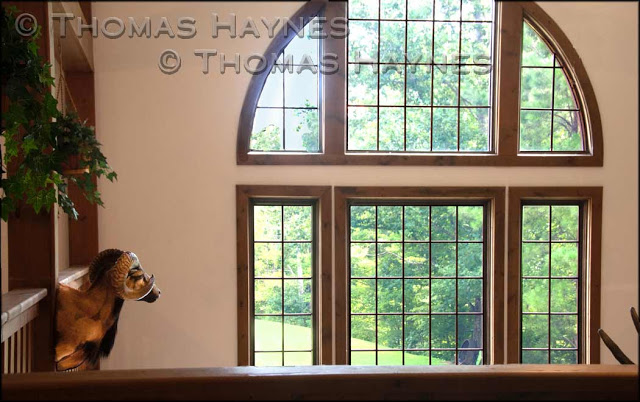
If you have seen the information sheet we mail or take to real estate agencies, then you have seen these two photos.  What that info sheet does not reveal is how the photo was edited in digital software to become the pleasing interior shot it is.  These pictures are also on the page "Free Photo Shoot" tabbed just under the heading photograph of the blog site.

Take a look at this first photo, an effort to emphasize and show the attractive main window from the open living area of the home.  Look at the photo and you might see more missing and more wanted than the text on the photo says.  This photo was to be one of the listing photos on the mls for the residence and property. The intent is to honestly show the home as it is...not exaggerated as to what is actually there and not less than the eye actually sees.  As it is below, the photo fails to show either the home or the window well. Really, no photo will match the human eye in dynamic range and ability to see things nicely. What we do as professionals is size up the situation as best we can then go to the editing room.  We know matching the actual eye view is not possible but we want to get close enough to show the home interior fairly. 

Real estate photo, main window overexposed

The eye would not see this first photo as did the camera.  Our eyes take in a much wider range of light intensities and then balance it all together..that is what the brain does and what we see.  Thank our God, our creator, for the ways we compensate for color and lighting to see as well as we do.  Now, off we go to the computer to edit the photo to look as it really should.
..
Overexposed window corrected with overlay, thomas haynes photoshoot

After editing, this is the photo used on the real estate listing. The picture shows an inviting and comfortable room with good openness to the outside. Outside light was slightly brighter than the interior and is shown that way to display the window and not detract from the room itself.

OK, so what did you do to make this photo look right?
There are generally two ways to take a photo like the one at the top and come up with the second one. 1. Have enough light in the room to expose the interior and what is outside the window in a natural balance:   In this room, that was not going to happen.  Available lighting was not strong enough and supplemental lighting with photo strobes would be very difficult and time consuming to set up to get this look.  

We took the other option. 2. Take more than  one photo from the same spot(tripod needed!) and combine the parts of the photos needed to make the final image. This is what Photoshop™ people call "making a selection" and "layering" of parts together.  None of this was done to deceive..keep that in mind. What is in the second photo was in the original view but the camera could not see it all in one shot. The purpose of this time consuming photo editing was to provide an image closer to what the eye actually sees than a camera is able to capture in one shot with available lighting.

Why is this example of photo editing posted here in the first place?
The answer is simple.  On occasion it is necessary to go extra steps at the editing desk to get a photo right for public view: An honest and effective marketing product..i.e. real estate photo.  We do that when needed. It should be part of the job.

Comments or questions are invited. Join in!     Email preferred for longer comments and thoughts we may post for discussion.
ThomasHaynesPhotoshoot Works out of Clinton, Tennessee